Introduction
As a cloud application, at morbit we’re very aware of how important security is to our customers. As such we’ve taken precautions to ensure that not only is our platform secure by design, but that we share with our customers what we’ve done. We use current industry-standard encryption for all data in transit (TLS 1.2 and 1.3 only).
This document will provide the security information on the web portal, servers, data in transit, data in storage, backups and our GDPR statement.
At a glance
- Encryption in transit: TLS 1.2 and 1.3 only
- Hosted in AWS Ireland (eu-west-1); all backups held within the EU
- Sensitive data encrypted in the database
- Multi-factor authentication available, and can be enforced for all users
- Continuous vulnerability scanning with AWS Inspector, plus OWASP ZAP and Mozilla Observatory
Web portal
Intrusion and vulnerability scanning
Our application is regularly scanned by these intrusion and vulnerability checkers:
- OWASP ZAP (https://owasp.org/www-project-zap/)
- Observatory by Mozilla (https://observatory.mozilla.org/)
- AWS Inspector - continual monitoring (https://aws.amazon.com/inspector/)
Certificates
Our site is only available to you via HTTPS. Any HTTP attempts will be redirected to HTTPS. Our certificates have the following encryption methods available:
Protocol: TLS 1.2 TLS 1.3 only
| Cipher | Protocol |
|---|---|
| TLS-AES-128-GCM-SHA256 | TLS 1.3 |
| TLS-AES-256-GCM-SHA384 | TLS 1.3 |
| TLS-CHACHA20-POLY1305-SHA256 | TLS 1.3 |
| ECDHE-ECDSA-AES128-GCM-SHA256 | TLS 1.2 |
| ECDHE-RSA-AES128-GCM-SHA256 | TLS 1.2 |
| ECDHE-ECDSA-AES256-GCM-SHA384 | TLS 1.2 |
| ECDHE-RSA-AES256-GCM-SHA384 | TLS 1.2 |
| ECDHE-RSA-AES128-SHA256 | TLS 1.2 |
| ECDHE-RSA-AES256-SHA384 | TLS 1.2 |
Passwords
For security purposes we have implemented strong password requirements. These are mandatory and are:
- Passwords must meet complexity requirements (at least three of four-character classes – upper case, lower case, numeric, symbol/international) and a minimal length of 10 characters
- 30-minute temporary account lockout after 3 incorrect access attempts
- Account access audited and maintained for minimum of 3 months
- Accounts are provided per user
Multi-factor Authentication (MFA)
We provide the ability to lock user access to MFA logins only. With support for Microsoft and Google Authenticator applications, you can either enforce your users to use MFA or make it optional.
Server Security
The platform runs as containerised services on Amazon ECS in AWS Ireland (eu-west-1). Container images are scanned continuously by AWS Inspector and rebuilt to apply security updates. The database runs on Amazon RDS, AWS’s managed database service, in the same region, and is kept up to date with operating system and Microsoft SQL Server updates.
Morbit Hub
The Morbit Hub runs as a service on Windows or Linux on the local LAN. It can be deployed multiple times on a subnet to ensure service resilience. It runs as an API engine that currently supports the following protocols:
REST API SNMP SSH Telnet WMI
The Hub enables users to interact using the local API of on-premises devices to allow monitoring and management. Some common scenarios are shown below:
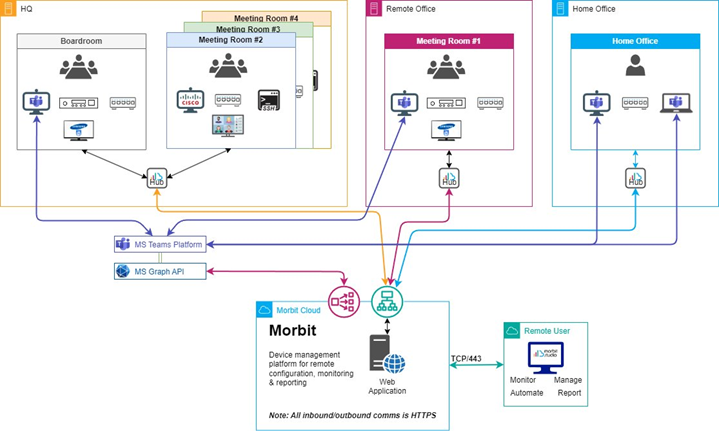
All instructions sent to the Hub over HTTPS are managed via the Morbit Cloud, and data is processed on the Hub prior to being sent to the Cloud. This ensures only authorised data is sent to the service. The way this is done has a patent granted, so you can read about the entire process of device discovery and data handling here: https://www.ipo.gov.uk/p-ipsum/Case/ApplicationNumber/GB1902637.6.
Connected Devices
To enable Connected Devices, this must be enabled on a company-by-company basis. Once enabled, each Hub in a network must be manually activated to allow the feature, via a locally run PowerShell script on the Hub host computer. This is to ensure only authorised persons may activate the feature.
The security behind the Connected Devices has been architected to ensure several steps are taken to prevent unauthorised access to devices and equipment:
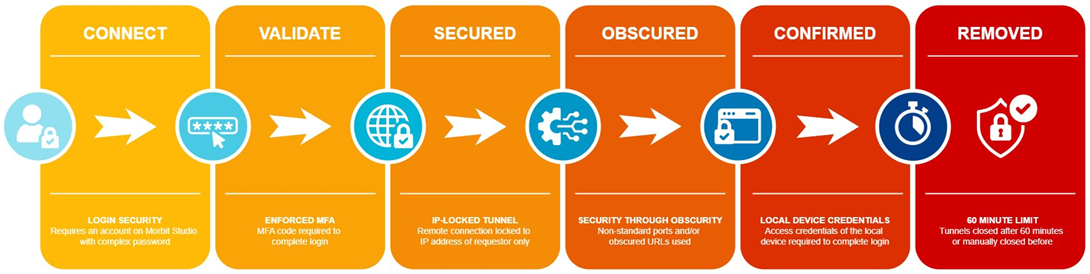
Even when access to the on-premises device is made, the local security and authentication of that device still applies to grant or deny access.
Data in transit
Public internet
All traffic from your networks to us, is done via HTTPS using your morbit hub. This communication has the following encryption applied:
Protocol: TLS 1.2 TLS 1.3 only
| Cipher | Protocol |
|---|---|
| TLS-AES-128-GCM-SHA256 | TLS 1.3 |
| TLS-AES-256-GCM-SHA384 | TLS 1.3 |
| TLS-CHACHA20-POLY1305-SHA256 | TLS 1.3 |
| ECDHE-ECDSA-AES128-GCM-SHA256 | TLS 1.2 |
| ECDHE-RSA-AES128-GCM-SHA256 | TLS 1.2 |
| ECDHE-ECDSA-AES256-GCM-SHA384 | TLS 1.2 |
| ECDHE-RSA-AES256-GCM-SHA384 | TLS 1.2 |
| ECDHE-RSA-AES128-SHA256 | TLS 1.2 |
| ECDHE-RSA-AES256-SHA384 | TLS 1.2 |
Your LAN
All traffic on your LAN uses the security of your network. If you have implemented IPSec on your Windows server hosting the hub, our hub will use that.
Microsoft Teams services
Users of the MS Teams module are not required to deploy any morbit software on their network. Our access into the service is via the Microsoft Graph API. This is diagrammed below:
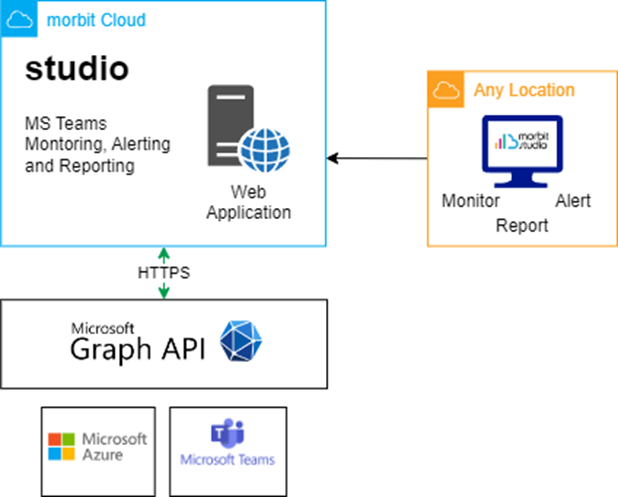
To do this, you will need to register an application in Azure with access to the Microsoft Graph API and relevant permission roles. These permissions are further documented in our Microsoft Teams Service Description document - available here.
Sensitive Data
Access to our database is restricted by firewall rules to Morbit’s application services and a small number of named administrator IP addresses; it does not accept connections from any other address. To ensure the security of your data, all sensitive data is encrypted, including but not limited to:
| Area | Encrypted data |
|---|---|
| All users | Usernames; passwords |
| Cisco endpoints | Login credentials |
| Poly endpoints | Login credentials |
| Call details | All participant display names; video addresses |
| Teams tenant | Tenant ID; tenant; client ID |
| Teams users | User Principal Name (UPN); email address; display name; job title; given name; surname; office location; preferred language |
| OEM Integration APIs (optional feature) | Organisation ID; token; client secrets |
Backups
GDPR
Morbit respects your privacy and is committed to protecting your personal data. For our latest privacy policy and GDPR information, please go to www.morbit.co.uk/privacy-policy.
Our Data Processing Agreement, including our list of sub-processors, is at www.morbit.co.uk/data-processing-agreement.
Further information
We realise that you may have further questions about our security, so feel free to contact us at help@morbit.co.uk.
Was this article helpful?
That’s Great!
Thank you for your feedback
Sorry! We couldn't be helpful
Thank you for your feedback
Feedback sent
We appreciate your effort and will try to fix the article