For security reasons, we must ask you to occasionally update your certificate that is used by your App Registration with MS Graph API. It is now time to do that.
- On the 5th February 2026 we will automatically update all MS Teams Tenants to use the 2026 certificate.
- You can no longer use Client Secrets as an authentication method after this date. (see footer about migrating from Client Secret to a Certificate)
To ensure you are update to date, you will need to add the new certificate to your App Registration in Entra. To do this, you must do the following steps.
- Login to Entra at: https://entra.microsoft.com/ and navigate to the 'App Registrations' page via the left menu pane.
- Locate the App Registration used in the platform and click it.
- Click the 'Certificates & Secrets' menu, which should take you to the 'Certificates' tab of the page. If it doesn't, click the 'Certificates' tab.
- Download the 2026 certificate here.
- In the 'Certificates' tab, click the 'Upload Certificate' button and upload the certificate from the above step. Your certificates listed should look like this:
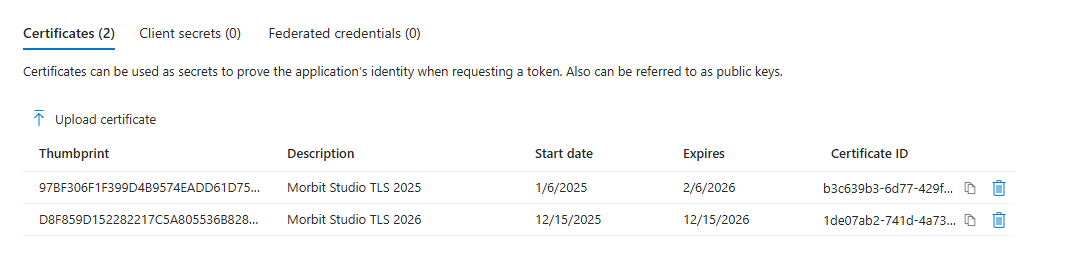
- (Optional after 6th February 2026) In the 'Certificates' tab, you can now remove the older 2025 expired certificate.
Additional updates if not already completed
- URGENT - PLEASE READ: Upcoming Changes to Microsoft API Policies
- Migrating a MS Teams tenant from authenticating with a Client Secret to a Certificate
Was this article helpful?
That’s Great!
Thank you for your feedback
Sorry! We couldn't be helpful
Thank you for your feedback
Feedback sent
We appreciate your effort and will try to fix the article